
Product
Doggie Pay: Stablecoin Payment Infrastructure for Merchants
An overview of Doggie Pay's positioning, Checkout / Customers dual rails, merchant portal, and open APIs—covering currently shipped stablecoin acquiring for investors, product managers, and engineers.
Doggie Pay: Stablecoin Payment Infrastructure for Merchants
Stablecoins are increasingly common in cross-border and digital businesses. For merchants, the hard part is rarely "can we accept USDC / USDT?"—it is whether they must also build wallets, address pools, inbound confirmation, outbound scheduling, ledger reconciliation, and signed callback notifications. That work is expensive and pulls teams away from the product.
Doggie Pay is merchant-side stablecoin payment infrastructure. Merchants can accept per-order payments (Checkout) or in-app deposits and withdrawals (Customers) without running their own on-chain wallet stack. Funds settle into a shared merchant USDC / USDT balance, and signed webhooks drive fulfillment.
This article is for investment institutions, VCs, product managers, and developers. It covers currently shipped capabilities only, not roadmap claims.
1. Positioning: merchant acquiring, not a consumer wallet
| Dimension | Current approach |
|---|---|
| Audience | Merchants and their product / engineering teams |
| Assets | USDC, USDT (allowlisted EVM networks) |
| Rails | Circle Developer-Controlled Wallets (DCW) |
| Fund ownership | On-chain credits enter the merchant pool; any in-product "user balance" is ledgered by the merchant |
| Settlement meaning | After on-chain COMPLETE, merchant balance updates and a webhook fires—not bank T+N |
In one line:
Doggie Pay lets merchants accept stablecoins without operating on-chain wallets and fund movement themselves.
It is not a fiat on/off-ramp, a retail consumer wallet app, a platform that holds end-user balances, or a take-rate billing system. Clear boundaries make the product easier to evaluate.
2. Why acquiring infrastructure, not another wallet SDK
When evaluating stablecoin acquiring, teams usually ask three things:
- How does the money move? Who is credited, where outbound starts, and how failures reverse.
- Can it plug into the product? Order payments and in-app balances, with webhooks that can be verified and retried.
- Can ops self-serve? Balances, refunds, withdrawals, keys, and callbacks without ticket-driven ops.
Doggie Pay packages these into two composable rails that share one merchant balance and one Integration API / webhook contract.
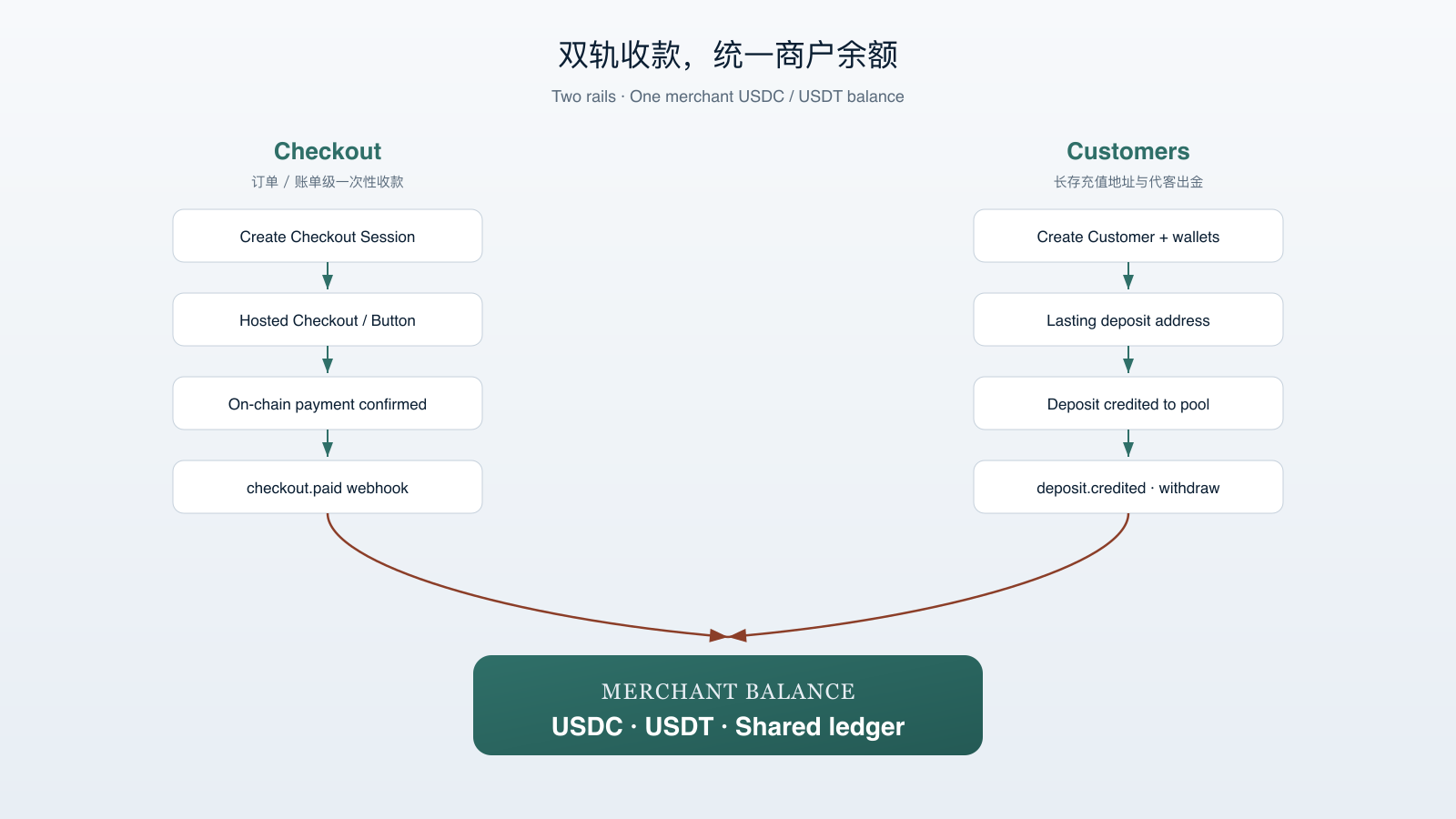
3. Two rails: Checkout and Customers, one balance
3.1 Checkout: pay per order or invoice
Best for ecommerce checkout, bill pay, and other one-shot charges.
Shipped capabilities:
- Server-created Checkout Sessions (amount, asset, chain, success/cancel URLs, metadata)
- Hosted Checkout on
pay.doggiepay.com: dedicated address + QR; buyers need no Doggie Pay account - Checkout Button SDK (
@doggiepay/checkout): embed a pay button that opens Hosted Checkout - Payment addresses from the merchant pool (one address per payment); confirmed inbound credits the merchant balance
- Webhooks:
checkout.paid/checkout.expired/checkout.cancelled - Refunds for paid sessions (buyer payout address + chain required; partial refunds supported)
Typical path: create session → buyer pays on Hosted Checkout → balance updates → webhook notifies fulfillment.
3.2 Customers: lasting deposit addresses and withdrawals
Best for in-app balances, stored value, and games or content platforms with ongoing deposit/withdraw flows.
Shipped capabilities:
- Create a Customer with the merchant's user id and receive long-lived deposit addresses on enabled networks (USDC and USDT share the address)
- Confirmed deposits credit the merchant pool; webhook:
deposit.credited - Withdrawals via Integration API (
to_address), or portal Prepare → email → Hosted Claim - Withdrawal lifecycle webhooks:
prepared/requested/submitted/complete/failed - Resend or cancel prepared withdrawals; unclaimed withdrawals expire and restore balance
Simple rule: the merchant owns the user ledger; Doggie Pay runs on-chain deposits and withdrawals.
4. Money model: how the merchant ledger works
The merchant side is a crypto ledger:
- Accounts are scoped by merchant × account type × currency; the live external type is crypto (USDC / USDT)
- Inbound (paid Checkout, Customer deposits) increases merchant balance
- Outbound (user withdrawals, merchant payouts, Checkout refunds) decreases merchant balance, with sufficiency checks
- No automatic FX; balance changes follow Circle terminal states
Operationally, "settled" means: inbound confirmed → merchant balance visible → signed webhook delivered. Merchants can also payout to registered wallets (Merchant Payout).
5. Merchant Portal: day-to-day ops without tickets
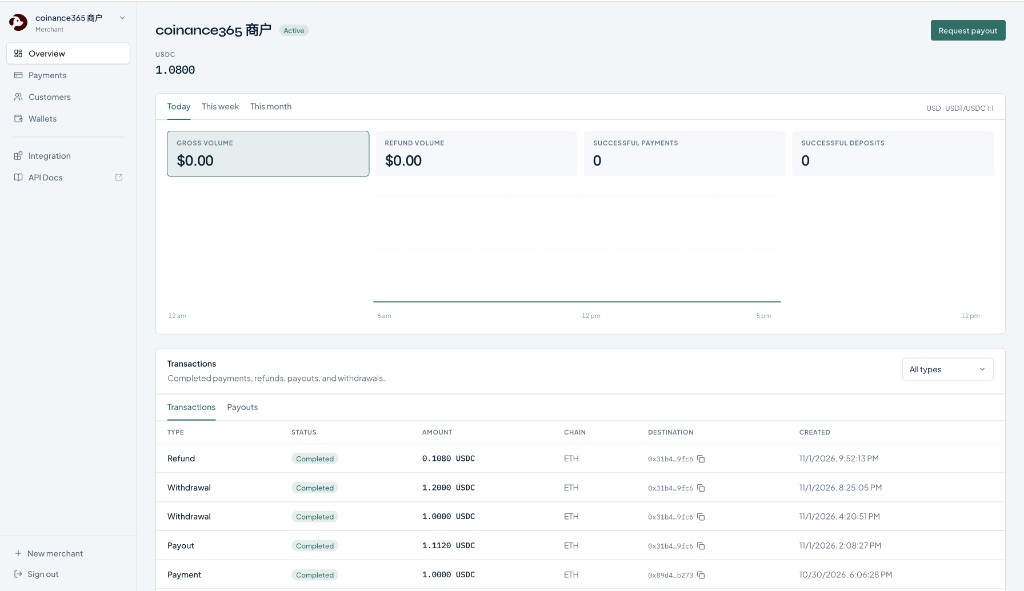
Merchants sign in with Google at merchant.doggiepay.com and handle daily ops without ticket-driven configuration. Overview shows balances, volume and refund metrics, the ledger, and payout requests.
| Area | What you can do |
|---|---|
| Overview | View USDC / USDT balances, volume and refund metrics, ledger; request payout |
| Payments | Create / inspect Checkout sessions, cancel pending, view payment detail |
| Refunds | Refund paid sessions; review refund history |
| Wallets | View Checkout address pool and lasting Customer deposit wallets |
| Customers | Search / create customers; prepare, resend, or cancel withdrawals |
| Integration | Manage API keys, webhook URL/secret; view delivery logs |
Signup creates the merchant and credentials immediately (Secret Key shown once). One Google account can manage multiple merchants for studios or multi-brand ops.
6. Open API and how to integrate
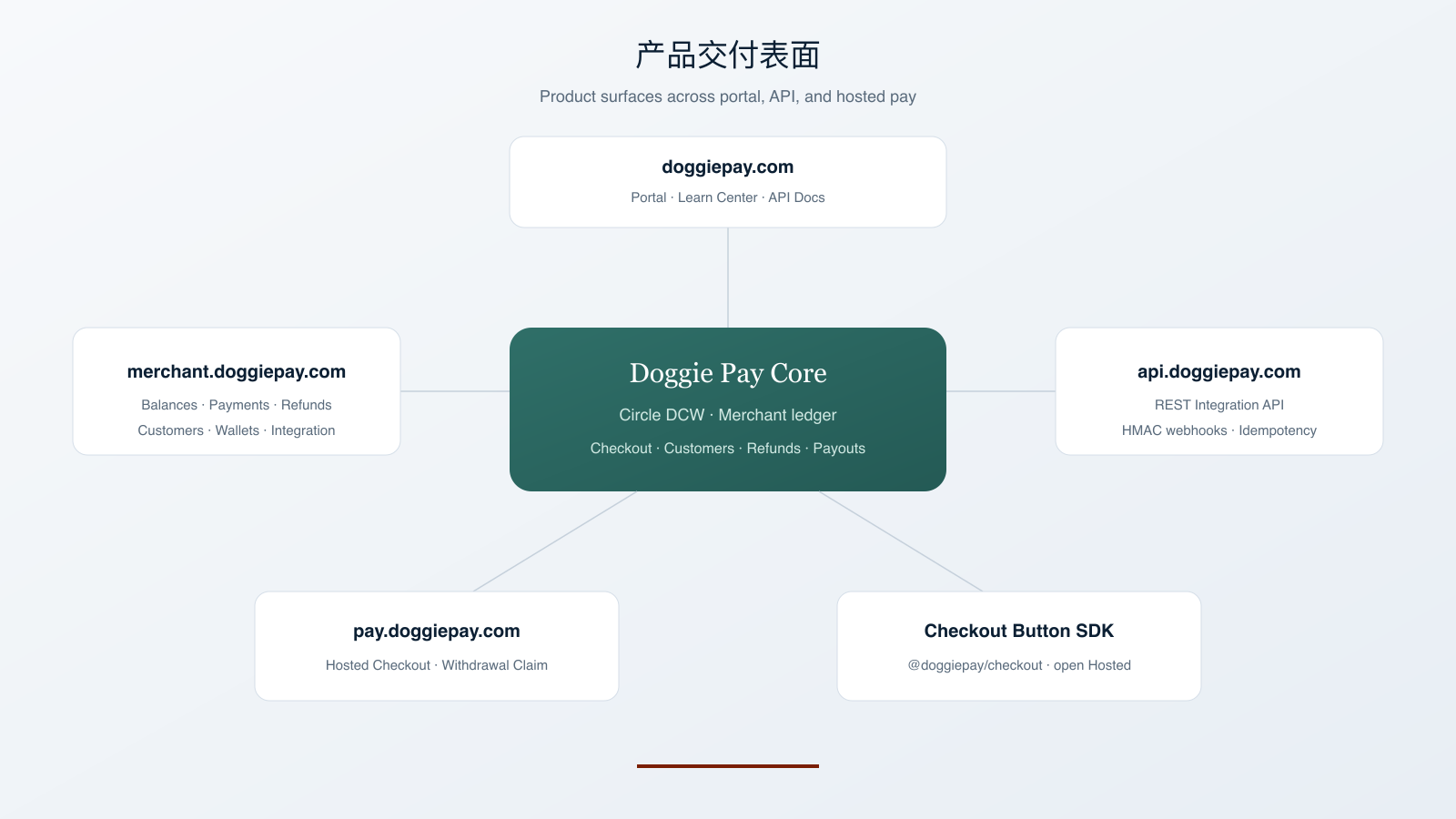
Third-party servers use the Integration API at https://api.doggiepay.com/v1/*. Auth is isolated from portal JWT and hosted public endpoints.
Shipped developer capabilities:
- Secret vs Publishable keys; Publishable limited to allowlisted read and create-checkout operations
- Required
X-DoggiePay-Request-Id; optionalIdempotency-Keyto reduce retry side effects - Consistent response shape and error codes
- HMAC-SHA256 webhooks (
X-DoggiePay-Signature) with retries and portal delivery logs - Coverage for Checkout, Customers, Wallets, User Withdrawals, Refunds, Merchant Payouts
- Public API Docs and this Learn Center
Buyers default to Hosted Checkout / Claim. For an in-site pay entry, use the Checkout Button SDK (@doggiepay/checkout) to open Hosted Checkout.
7. Assets, networks, and Circle
| Item | Current implementation |
|---|---|
| Assets | USDC, USDT |
| Networks | EVM; enabled set is platform-allowlisted (Ethereum and Base recommended first) |
| Wallets | Circle Developer-Controlled Wallets |
| Inbound | Signed Circle notifications → async confirmation → merchant credit |
| Outbound | Platform hot-wallet transfer → status sync → merchant debit + webhook |
Non-allowlisted tokens and non-EVM networks are out of v1. Balances move only after terminal completion, so unfinished chain events do not credit early.
8. Security and compliance: boundaries you can state
Prefer "verifiable controls" over broad compliance claims:
- Circle inbound signature checks; merchant webhooks use HMAC + timestamp
- Key separation: Secret stays server-side; portal session vs Integration auth are isolated; claim secrets live in the URL fragment
- Idempotent constraints on inbound and key requests to reduce double-credit / double-payout risk
- Chain and asset allowlists; incomplete or unknown events do not move balances
- Merchants can rotate API keys and webhook secrets; the platform can disable merchants
Boundary: end-user KYC / AML stays with the merchant. Doggie Pay does not ship a consumer identity product and does not hold end-user business balances.
9. Who should evaluate it, and where to start
| Role | Focus | Entry point |
|---|---|---|
| Investors / VCs | Positioning clarity, rail coverage, money model, delivery completeness | This article + portal demo + API Docs |
| Product managers | Checkout vs Customers fit, fulfillment loops, refund / withdraw UX | Learn + Merchant Portal |
| Backend engineers | Auth, idempotency, webhooks, customer and withdrawal APIs | API Docs |
| Frontend engineers | Button SDK, Hosted return flows | Checkout SDK / Hosted Checkout |
| Merchant ops | Balances, refunds, payouts, credentials | Merchant Portal |
10. Shipped capability stack
- Positioning: merchant stablecoin payment infrastructure (Circle DCW, USDC / USDT, EVM)
- Checkout: Session → Hosted / Button → credit +
checkout.*→ payment refunds - Customers: lasting addresses → merchant pool +
deposit.credited→ API / email-claim withdrawals - Merchant treasury: shared balances, metrics, payout accounts, Merchant Payout, self-serve keys/webhooks
- Developer access: REST Integration API, verifiable webhooks, Checkout Button SDK, public docs
11. Get started
- Open the Merchant Portal and sign up with Google
- Store the Secret Key and configure your webhook endpoint
- Enable Checkout, Customers, or both
- Follow API Docs for the first session or customer create
For deeper integration detail, continue with Getting started, Accept a payment, Webhooks, Create a customer, and User withdrawals in API Docs.